Thank you for subscribing!
PC Manager is a one-stop-shop with tools to supercharge your PC
Supercharge the performance of your Windows 10 or Windows 11-powered machine with a clever new app from Microsoft. Known as PC Manager, the software has launched worldwide after two years of public trials.
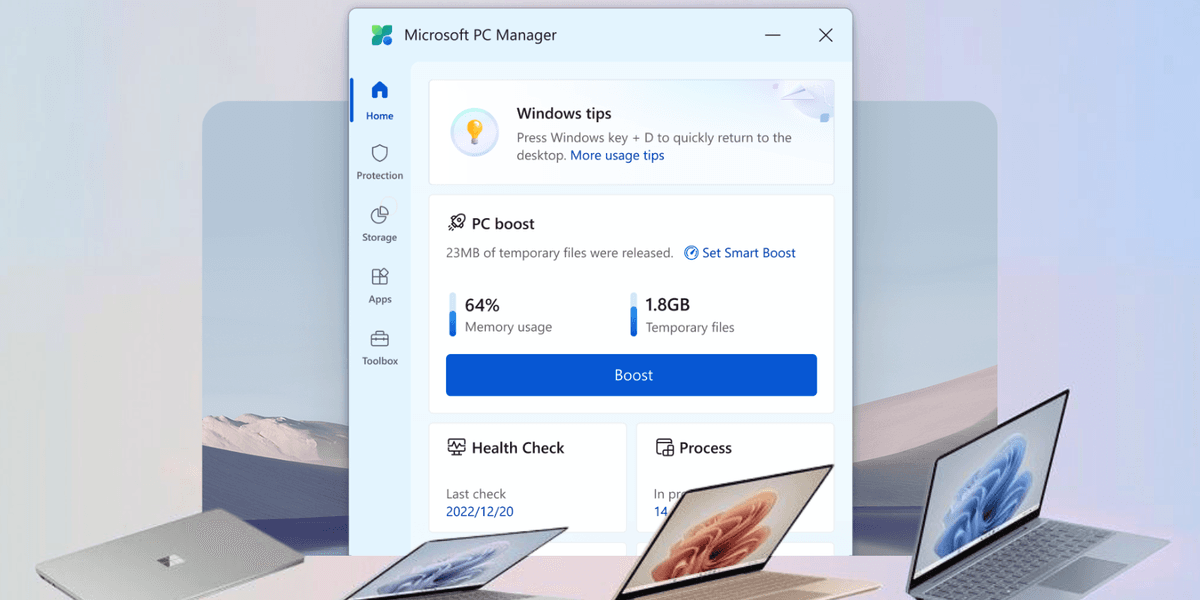
PC Manager doesn't introduce many new features. Instead, it brings together a slew of existing options — usually buried deep within the Settings app — into an easy-to-navigate new menu. With a few clicks, you'll be able to purge temporary files from your machine to free-up space and quash any viruses.
It's available to download for free from the Microsoft Store today.
Microsoft's PC Manager app first surfaced over two years ago. Since then, the app has only been available to download in certain regions worldwide. And even if you could download it, Microsoft listed the software as a beta version — so you could expect to come across glitches and bugs as the US company tested and trialled the software with users.
Interestingly, the website for PC Manager still lists the app as “coming soon,” but as spotted by the eagle-eyed team at Windows Latest, the app has now launched in the Microsoft Store globally.
As the name suggests, PC Manager is a central hub that combines everything you might need to optimise, manage, and improve the performance of your machine. It bundles anti-virus functionality integrated with Windows Security, clean-up features to streamline performance, and storage management tools to free up space on your internal hard drive.
If you’re looking to quickly improve performance on your Windows 10 or Windows 11-powered machine, look no further than the one-click boost option.
This will clean up the clutter on your machine — usually, files left over from uninstalled applications or temporary files used during a system update that wasn’t removed automatically — to free up space on the internal storage. It will also perform a “health check” to ensure that performance hasn’t been hampered by malware or other nefarious software under the bonnet.
At the time of writing, it has a solid 4.3-rating in the Microsoft Store from 161 reviews.
While there are third-party applications that offer similar functionality, many of these demand a subscription fee for the privilege. Although it’s taken years for the teams at Microsoft to finalise the PC Manager app, now that it’s here, the app is sure to be popular with those trying to eke the best performance from their machines.