Thank you for subscribing!
Microsoft is preparing to add a new age verification system into Windows 11, making it easier to prove your age to unlock access to applications and websites. It will also shift how your PC handles personal information.
Instead of each and every application asking for your date of birth or making you tick one of those "I'm over 18" checkboxes, the operating system itself will share your age bracket with approved apps — letting you sail through the age checks without a single click.
While that's undoubtedly faster and more convenient, it does raise some questions about data privacy.
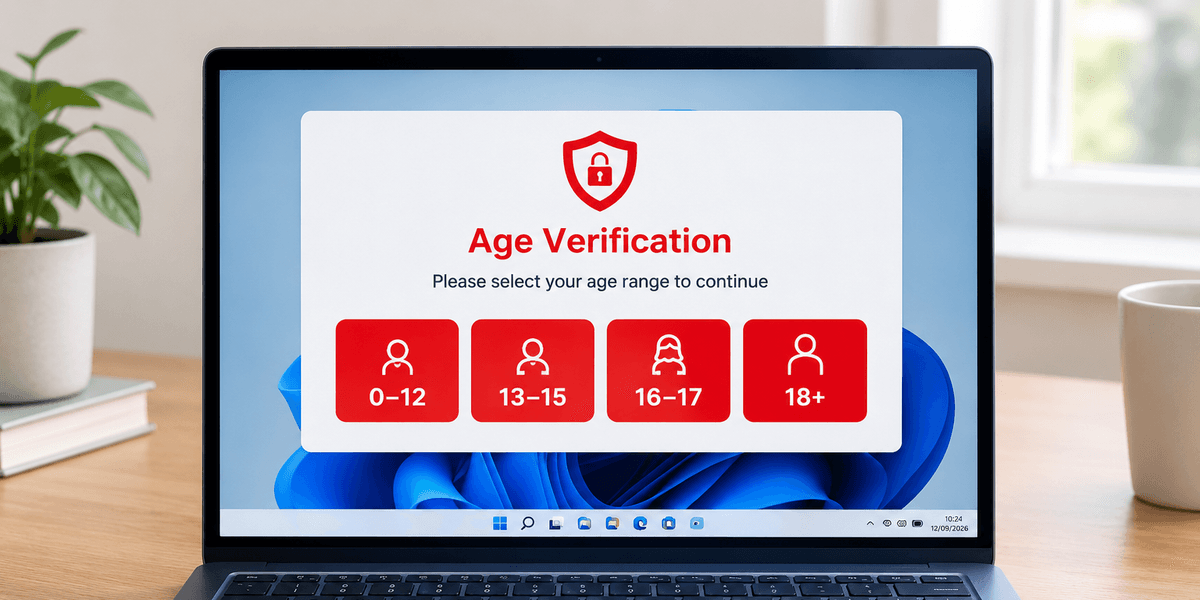
However, Microsoft isn't asking for your exact birthday. Instead, Windows will only tell an application whether you fall into a specific age band, like 13-15 or 18+.
The idea is for apps to get just enough information to decide what content or features you should see, without collecting sensitive details they don't actually need. This comes as Microsoft's response to growing pressure from regulators in the UK, EU, and US, all of whom are pushing for stronger child safety protections online.
For instance, Ofcom's requirements under the Online Safety Act in the UK say platforms must use highly effective age checks to make sure children cannot access age-restricted content.
Its July 2026 report also highlighted a problem with age inference, where platforms try to guess a user's age based on their behaviour. The problem is that the system needs to watch someone use the service before it can make that guess, meaning a child could already have accessed restricted content before being identified as underage.
In other words, Ofcom wants platforms to be able to check someone's age before giving them access, instead of relying on a system that only figures out they might be a child after the fact.
Over in the EU, the European Commission is favouring privacy-preserving methods. Its "mini wallet" solution lets people prove they're over 18 without handing over any other personal data, and it can be adapted for other age thresholds too.
Across the Atlantic, California's Digital Age Assurance Act of 2026 would make operating system providers the primary source of age signals for apps and certain websites — though it specifically rules out requiring government ID or biometric scans.
Here's how Microsoft will work out age verification under the bonnet. Windows 11 will sort you into one of five age brackets— under 10, 10-12, 13-15, 16-17, and 18 and above. When an app needs to know how old you are, it asks the operating system, which hands back the relevant bracket, never your actual date of birth.
There's also a separate check for whether that age has been properly confirmed. This verification status can come back as verified, unverified, opted out, temporarily unavailable, or not applicable.
Not just any app can request this information, though. Microsoft's Digital Safety platform first checks the identity of whichever app is asking, and only registered applications get meaningful results back.
The intended uses are things like social features, in-app purchases, user-generated content like making a video, and age-restricted media, so random apps won't be quietly reading your age signal.
Microsoft Teams Free — the company's video calling and messaging platform — is one of the first apps to feel the impact of this new system. You will soon be prompted to verify your age through your Microsoft account, and those who skip the process won't get full access to all the features.
This includes meeting and call recording, Copilot, and other Artificial Intelligence (AI) tools, and community features could all become unavailable until you complete verification. It can take up to 24 hours after verifying for Teams to restore full access.
For younger users, the restrictions go further. Minors are completely blocked from creating or joining Communities in Teams Free. They also get reduced discoverability by default — other users can't search for them by phone number or email address unless the child actively chooses to make their email visible in Settings.
Children can still use Teams Free, but only when their Microsoft account has the required parental consent.
Microsoft isn't the only tech giant heading in this direction. Google Play already offers its own Age Signals in testing mode, returning brackets like 0-12, 13-15, 16-17, and 18+, with rules banning developers from using the data for advertising or profiling.
Apple takes a slightly different route, letting parents in Family Sharing control whether age information gets shared with apps on a case-by-case basis.
It's worth noting that Microsoft's new rules aren't actually switched on yet. The documentation has been published ahead of time, and the company says the system should go live later this year, likely around the Windows 11 26H2 launch.
There is a privacy trade-off here, though. Trust shifts towards the platform itself, and Microsoft's documentation doesn't fully explain how it establishes an account's age. Still, sharing an age bracket gives away far less than handing every app your birthday or identity documents such as a passport or driver's license.