







Fraudsters are going after your X account.
A wave of fake emails is attempting to steal your login details for the social network X, formerly known as Twitter before its acquisition by multi-billionaire Elon Musk.
The scam works like this: you receive what looks like a security alert from X, warning that someone has logged into your account from an unfamiliar device. The message might say the login came from Arizona using Firefox on a Mac — even though you're sitting in London and haven't been near a Mac in ages.
It feels urgent, and your gut reaction is to click through and secure your account straight away.
That's precisely what the fraudsters are banking on.
The email urges you to reset your password or check which apps have access to your account. The advice itself mirrors what X genuinely recommends — but the links don't lead to X at all. Instead, they take you to fake websites built to harvest your password or trick you into handing over direct access to your account.
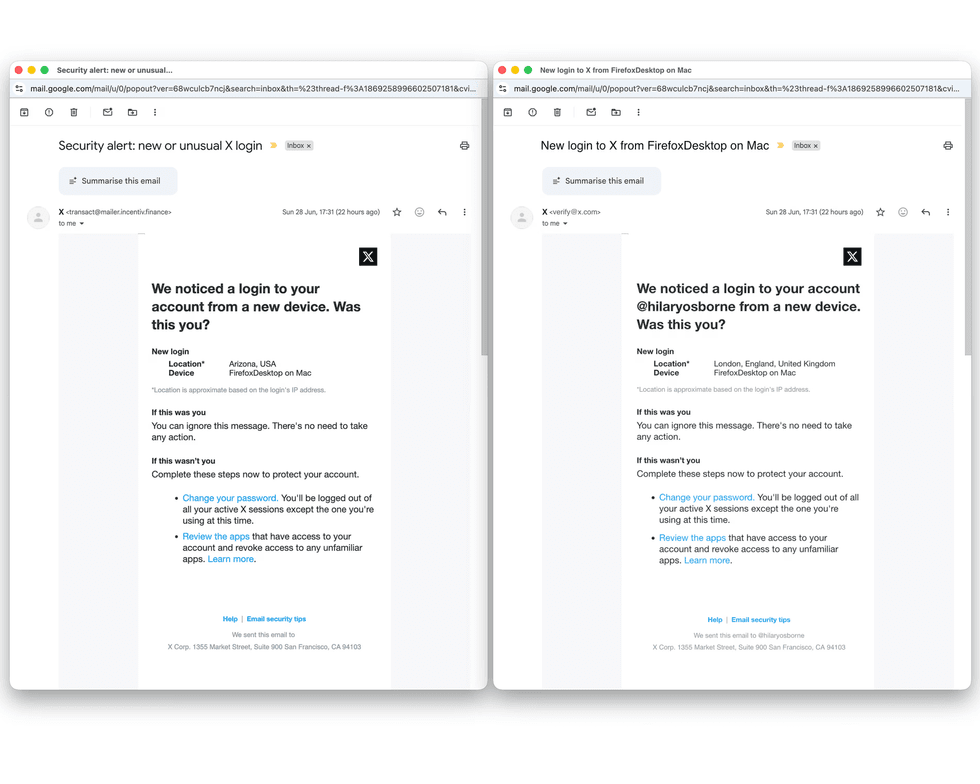
The fraudulent emails are near-perfect copies of X's real login notifications, right down to the logo, colour scheme, layout, and even flawless spelling and grammar
|What makes these bogus messages so tricky to spot is just how polished they are. The fraudulent emails are near-perfect copies of X's real login notifications, right down to the logo, colour scheme, layout, and even flawless spelling and grammar.
There are subtle clues, though. The fake messages tend to leave out your X handle and stay vague about the supposed login location.
However, there are two major giveaways — the email address it comes from and where the link takes you.
The platform states it will only ever email you from @X.com or @e.X.com addresses. It will never include attachments in its emails, and it will never request your password through email, direct message, or reply.
Stolen X profiles are typically used to carry out cryptocurrency scams, launch further email scams against other users, and spread misinformation
|GETTY IMAGES
Before you do anything, hover over those links and have a proper look at the sender's address — that's where the mask slips.
Once criminals get their hands on a hijacked account, they waste no time putting it to work. Stolen X profiles are typically used to carry out cryptocurrency scams, launch further email scams against other users, and spread misinformation — all while hiding behind someone else's identity.
If one of these emails does land in your inbox, you can flag it to your email provider using their built-in spam and phishing reporting tools.
LATEST DEVELOPMENTS
- Ninja just unveiled the biggest change to the microwave in 71 years since it was invented
- Social media curfew tested in the UK for first time, but experts warn it's 'a scattergun approach'
- New Windows 11 update brings major speed boost to your PC
- Instagram's long-awaited change to your grid is finally available — 'we've only been asking for a decade'
And if you've already clicked the link by accident, your information should still be protected unless you've handed over your username and password.
X said in the Help Center: "Accounts may become compromised if you've entrusted your username and password to a malicious third-party application or website, if your X account is vulnerable due to a weak password, if viruses or malware on your computer are collecting passwords, or if you're on a compromised network.
"Unexpected updates don't always mean that your account was compromised. Occasionally, a third-party application can have a bug that causes unexpected behavior. If you see strange behavior, changing your password and/or revoking connections will stop it, as the application will no longer have access to your account.
"It's best to take action as soon as possible if updates are appearing in your account that you did not post or approve."
If you think your account has been compromised, X's help guide walks you through the recovery process, and the company may reset passwords on accounts it suspects have been breached.