Thank you for subscribing!
Microsoft has admitted that performance in parts of its Windows 11 operating system leave a lot to be desired. Specifically, the right-click menu has been singled out as "cluttered and sluggish", with Microsoft highlighting the need to "dramatically reduce the time between right-clicking and having a menu that’s fully ready to use."
"What people remember most are the worst moments. A single freeze while renaming a file, a slow right-click, or a Home view that flashes and reloads can outweigh dozens of smooth interactions," Microsoft admits.
It's one of a series of announcements about under-the-bonnet tweaks to bolster everyday performance in Windows 11. Microsoft has started to test its new design with Windows Insiders, those who have volunteered to beta test incoming features and upgrades coming to the desktop operating system, ahead of a worldwide release.
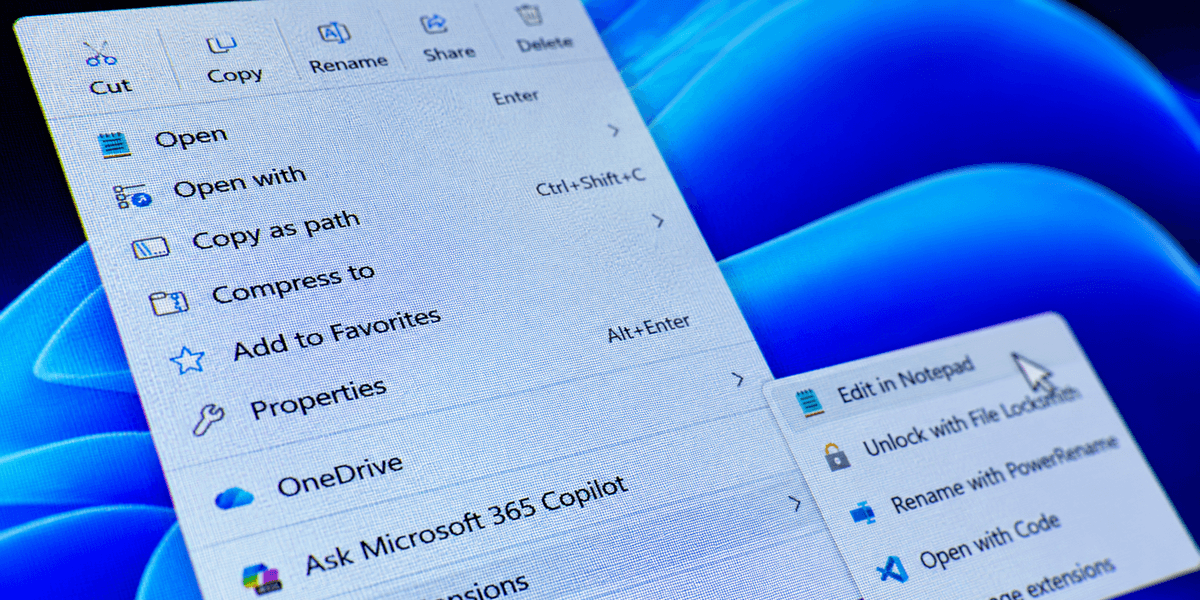
In a blog post about the roll-out, Microsoft confirmed: "We’re excited to announce an updated context menu that delivers a faster, simpler, and more customizable experience. The new design reduces top-level clutter, keeps commonly used actions easy to access, and introduces a new Settings experience that gives you more control over what appears in the menu."
First up, the new right-click menu is designed to be much, much less cluttered. Common tasks like Cut, Copy, Paste, Rename, Share, and Delete are now listed horizontally as tile-like shortcuts at the top of the right-click menu, trimming the length of the window needed to display all of the options.
Other tasks are now hidden in sub-menus, like App Extensions, which includes any tasks linked to a particular Windows 11 app. This includes Copilot, Clipchamp, Notepad, Paint, OneDrive, and Photos.
Better still, Microsoft is making the right-click menu entirely customisable. Don't like the new design? You can decide exactly what's featured in the menu, switching off on or off individual actions, like Send To, Print, Create Shortcut, Copy As Path, or Rotate Image. You can choose which actions appear in the App Extensions submenu, live in the main menu, or vanish from the right-click menu altogether.
Lastly, if this all sounds like too much change — you can undo all of that to bring back the decades-old right-click menu that you're accustomed to. In the blog, Microsoft summarises: "We know many people have years of muscle memory from the Windows 10 menu, so we’ve added options to bring that feel back.
"You can list the main commands (Cut, Copy, Paste, Rename, Delete, and Share) inline directly in the menu instead of as a row of icons, and you can move Properties down to the very bottom."
Under the bonnet, Microsoft says it has tackled the underlying issues behind common freezes, hangs, or delays in File Explorer. When the latest update leaves beta status, File Explorer should launch faster, and you'll notice smoother performance when browsing through directories, renaming files, or selecting multiple items. File renames won't get interrupted by background synchronisation any more, which had been a persistent annoyance.
Navigation has been enhanced too, with the Address Bar now accepting a wider range of inputs and middle-click support expanded for opening folders in new tabs.
All of these improvements are being tested through the Experimental channel for Windows Insiders. If you're eager to try it yourself, you'll need to be running the latest Insider build to access the feature.
Microsoft hasn't confirmed an exact rollout date for all Windows 11 users, though it could arrive by the end of this year depending on how testing goes. Not everyone is celebrating, with many online voicing frustration that these improvements have taken so long to materialise. One PC user on Reddit summed up the mood bluntly: "They had 5 years to do that. Better late than never I guess."
Microsoft has pledged to continue its work on improving performance, writing: "We are committed to continue doing the hard work and consistently improving File Explorer month after month. Not every update will be obvious on its own, but together they should make File Explorer feel faster, polished, and more dependable across tasks users do most."